12 Projects
-
Pixels To Steps - Cartpole Stabilisation from Pixels
-
Robot Localization & Autonomous Navigation
-
3D Line-of-Sight Audit System for Intersections
-
RL Locomotion & Trajectory Optimization
-
Smart Switch - Smart Home Device
-
Blendit (Blender + Git)
-
Enigma - Enigma Machine Emulator
-
Seam Carving - Content Aware Resizing
-
Transform - Image Processing Tool
-
Kalman Mobile & Kalman Desktop
-
Bachelor's Project
-
OneProjectFile - Version Control for Creative Professionals
Cartpole stabilisation from pixels alone, with no angle or position sensor at inference time. Implements the linear vision-based control framework of Lee et al., adapted for simulation in Gym CartPole. A student policy trained on 40 teacher demonstrations achieves 100% survival across 100 random initial conditions under plant mismatch, running as a single matrix multiply at 60 Hz.
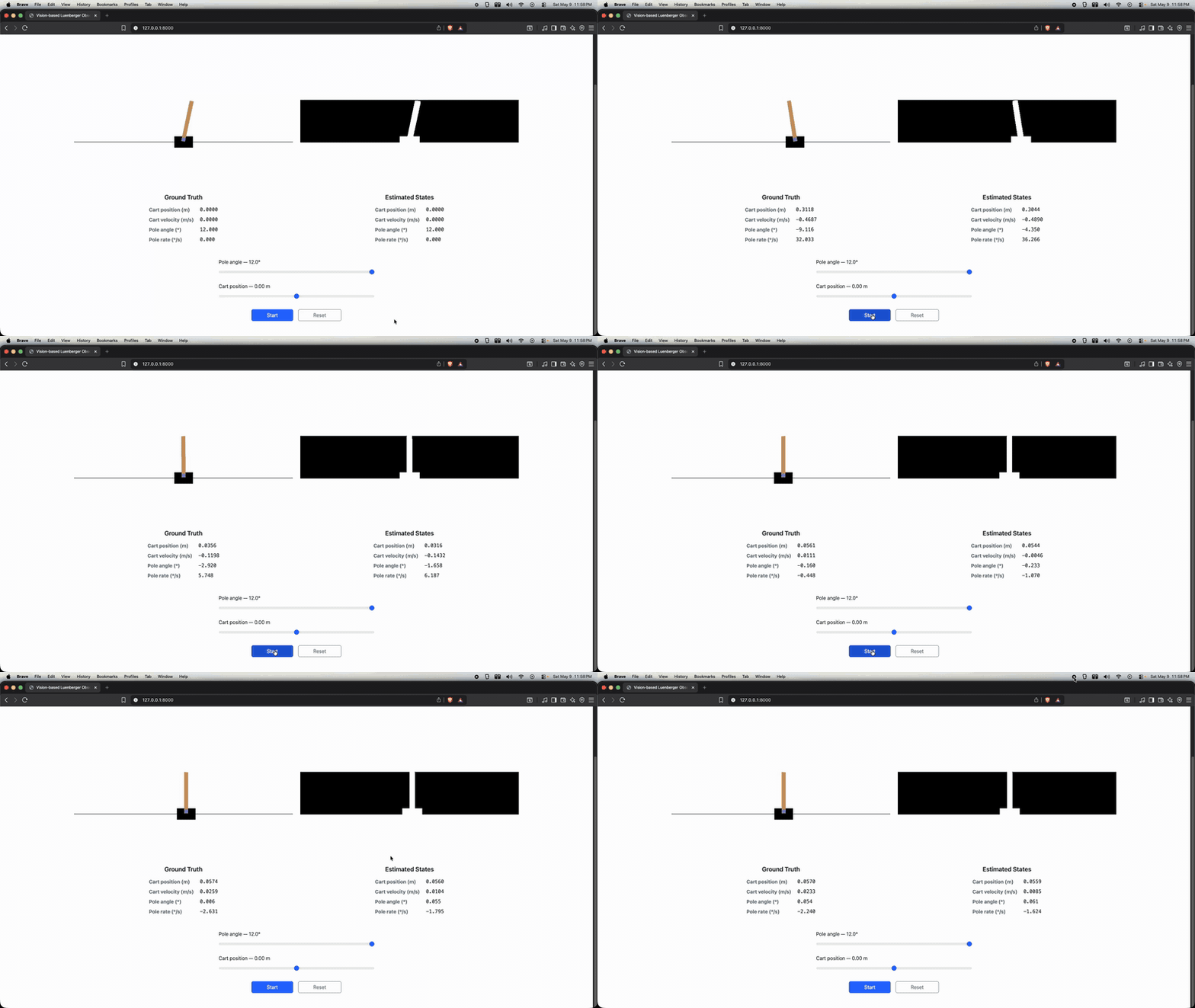
Data collection. A privileged teacher with full state access runs an LQR policy, with the gain computed offline by solving the discrete-time algebraic Riccati equation, and logs state, input, and pixel frame tuples.
Observer training. A hybrid Luenberger observer is fit to the collected demonstrations. The nominal dynamics matrices are fixed from linearisation around the upright equilibrium; only the pixel-to-angle mapping is learned via Ridge regression on flattened binary frames produced by Gaussian blur and Otsu thresholding.
Inference. The observer blends the open-loop dynamics prediction with the pixel-derived angle estimate at a fixed weight and closes the loop with the LQR gain. No angle sensor is used.
Key Results:
| Demos | Pixel-to-angle R² | Pixel-to-angle RMSE | Survival | Paper-success* |
|---|---|---|---|---|
| 20 | 0.980 | 0.181° | 96/100 | 75/100 |
| 40 | 0.987 | 0.123° | 100/100 | 72/100 |
* Paper-success: cart within 0.176 m, pole within 2° at t = 2.5 s.
The 72% paper-success rate is meaningful in context: the original paper's observer corrects all 4 states directly from pixels; this implementation corrects only the pole angle (1 state), with cart position propagated entirely by the open-loop dynamics. The 72% reflects accumulated cart position drift, not instability; survival is 100%.
Tech Stack: Python | Gymnasium | NumPy | scikit-learn | Control Systems | Computer Vision | State Estimation
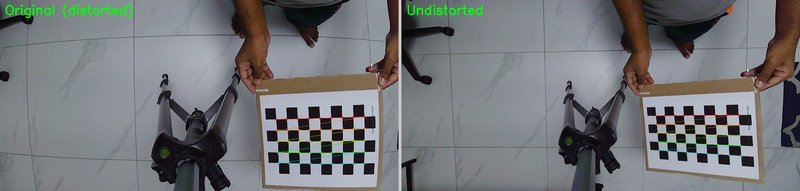
Complete autonomous navigation stack built from scratch and deployed on a physical Ackermann steering robot, across five progressive labs in the NYU graduate course ROB-GY 6213. Every algorithm (motion model identification, camera calibration, EKF, particle filter, and MPPI) is implemented without library abstractions and validated on real hardware.
Motion Model. Controlled experiments at five steering angles and three trial durations yield ground-truth trajectory data. Separate degree-2 polynomial models are fit for left and right turns via nonlinear least squares, capturing the robot's mechanical asymmetry in both mean displacement and variance.
EKF Localization. An Extended Kalman Filter fuses high-frequency wheel odometry with sparse ArUco marker observations from a calibrated overhead camera. The nonlinear unicycle model forms the prediction step; ArUco pose provides the linear correction. 95% confidence ellipses grow when the robot leaves the camera's field of view and shrink on re-entry, directly reflecting the filter's online uncertainty estimate.
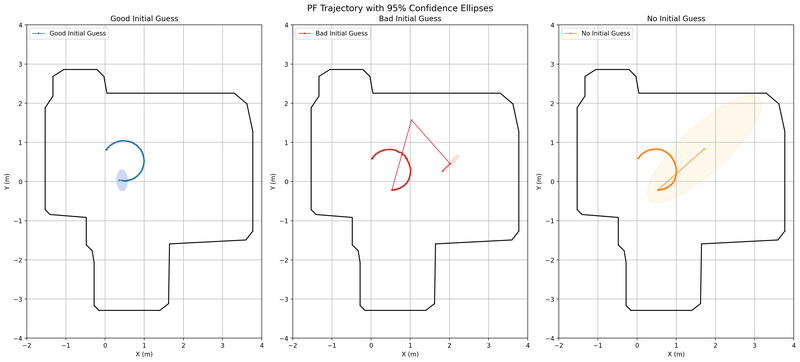
Particle Filter (MCL). A full Monte Carlo Localization pipeline (motion update, RPLidar beam model likelihood, systematic resampling, and adaptive reinitialization) localizes the robot within a pre-built occupancy map. Benchmarked under three conditions: accurate prior, wrong prior, and completely unknown pose.
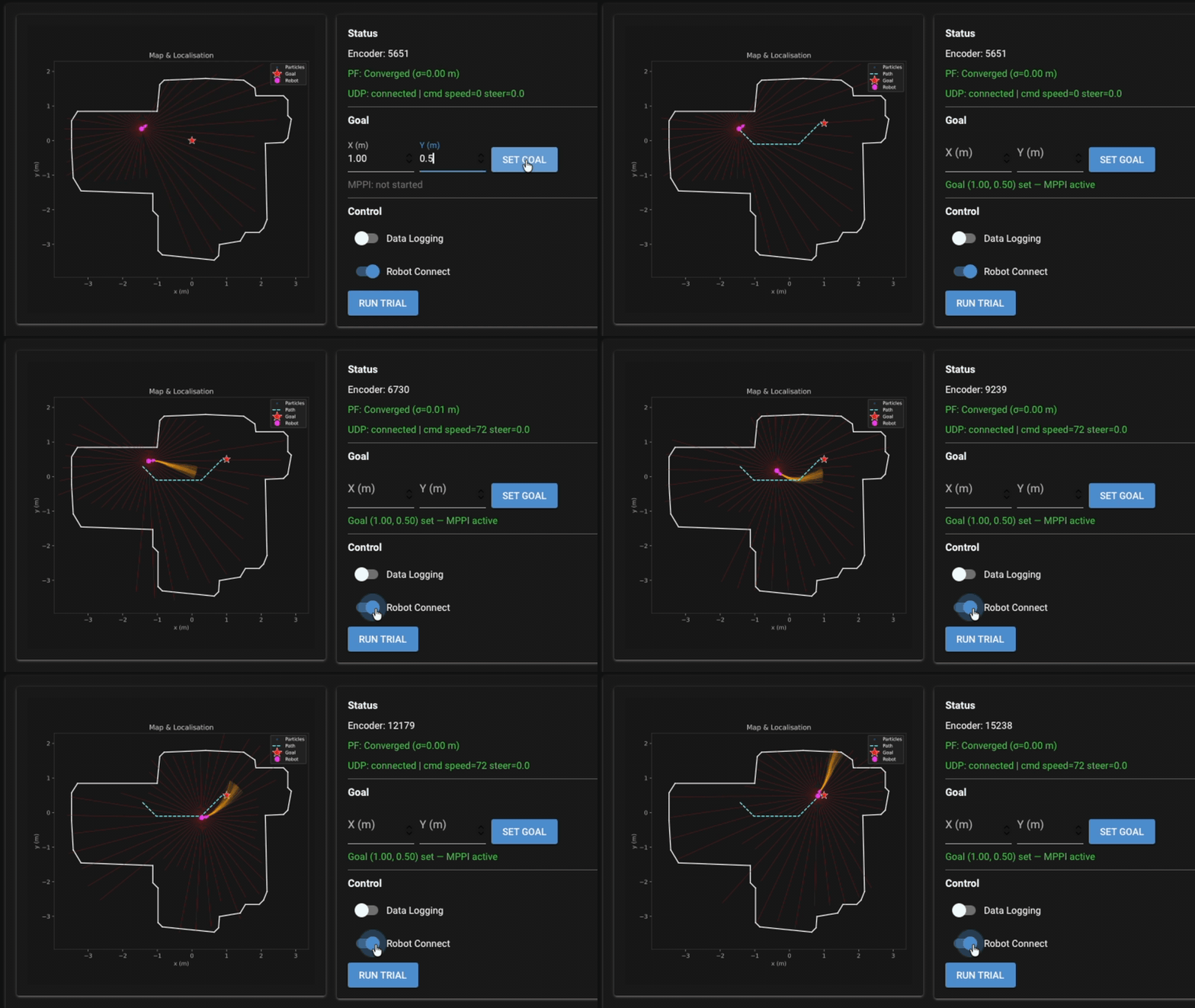
MPPI Navigation. A Model Predictive Path Integral controller closes the full autonomy loop. A Euclidean Distance Transform of the occupancy map converts obstacle geometry into a continuous clearance cost field. At each control step, thousands of stochastic candidate trajectories are forward-simulated, weighted by composite cost (goal proximity, path following, obstacle clearance), and collapsed into a single control via importance-weighted averaging, all running in real time on the physical robot.
Key Results:
| Metric | Value |
|---|---|
| EKF positional RMSE | 4.14 cm |
| EKF correction acceptance rate | 88.2% |
| PF convergence from unknown pose | < 1 s |
| PF steady-state position spread (σ) | 0.27 cm |
| PF heading spread (σ) | 0.90° |
| PF recovery from 1 m / 90° error | 0.63 s |
Tech Stack: Python | C | OpenCV | NumPy | State Estimation | Motion Planning | Control Systems
A multi-camera 3D visibility analysis system developed as a group project, designed to audit pedestrian and vehicle sightlines at urban intersections and detect occlusions before they cause accidents.
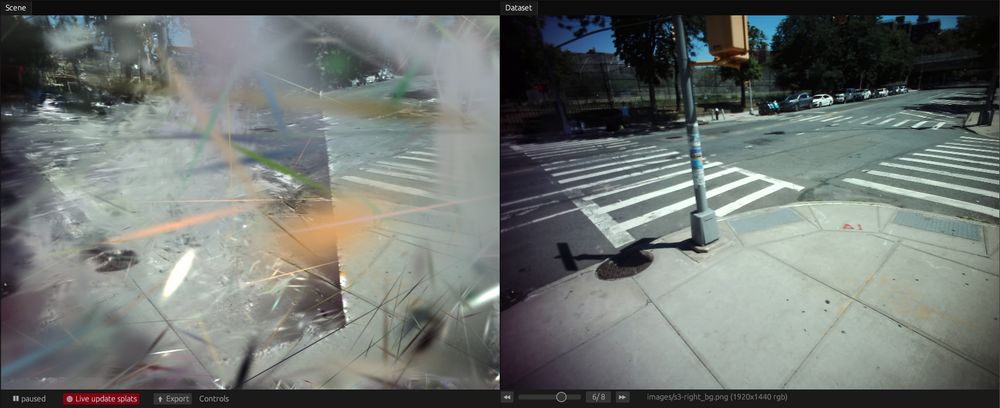
My primary contribution was the 3D reconstruction pipeline: eight calibrated cameras at 30 FPS stream frames over UDP to a central pipeline, reconstructing a 1.34-million-point 3D point cloud of the intersection using Structure-from-Motion and 3D Gaussian Splatting. The team's broader system layers YOLOv8 with ByteTrack on top for per-camera detection and consistent object IDs across frames. Visibility rays are cast through the point cloud for each tracked agent, and per-frame line-of-sight scores are aggregated into a spatial heatmap of occlusion risk.
Key Results:
| Metric | Value |
|---|---|
| Point cloud size | 1.34 M points |
| Detection precision | > 90 % |
| Detection recall | > 85 % |
| Mean visibility score | 0.973 |
| Earlier hazard detection vs. 2D baseline | ~12.2 s |
| Camera count / frame rate | 8 cameras @ 30 FPS |
Tech Stack: Python | C++ | YOLOv8 | ByteTrack | Open3D | Gaussian Splatting | SfM | ArUco | OpenCV | UDP
Trained a Proximal Policy Optimization (PPO) agent in a custom Gymnasium simulation environment for continuous locomotion tasks, benchmarked against Sequential Quadratic Programming (SQP) trajectory optimization.
A custom Gymnasium environment was built to simulate the robot dynamics, reward shaping, and episode resets. The PPO agent was trained with Stable-Baselines3 using entropy regularization and clipped surrogate objectives. Performance was compared against an SQP-based trajectory planner operating on the same dynamics model, evaluating task completion rate, energy efficiency, and generalization to perturbed initial conditions.
Tech Stack: Python | Stable-Baselines3 | Gymnasium | NumPy
A custom ESP32-based smart switch that integrates with Home Assistant over local LAN, replacing cloud-dependent commercial switches to eliminate latency and privacy concerns.
The firmware runs on the ESP32 and communicates over the local network using the Home Assistant WebSocket API. By keeping all traffic on the LAN, the switch responds in under 1 ms — compared to 80–200 ms round-trip through cloud APIs. The Home Assistant integration is configured via YAML and exposed as a standard switch entity. A small JavaScript dashboard was built for direct browser-based control without Home Assistant.
Key Results:
| Metric | Value |
|---|---|
| LAN round-trip latency | < 1 ms |
| Cloud API latency (replaced) | 80–200 ms |
| Units deployed | 5 |
Tech Stack: ESP32 | Home Assistant | YAML | JavaScript
Blendit (Blender + Git)Star
Aug 2022 - Sep 2022
Blendit (Blender + Git) - A Git integration that brings Version Control to Blender.
While Git and other Version Control Systems (VCS) can track .blend (binary) files it does not make much sense as they are designed for textual files.
That said, according to Sybren on Blender Stack Exchange, Blender Institute uses Subversion.
At the Blender Institute / Blender Animation Studio we use Subversion for our projects. It works fine for blend files, but you have to make sure they are not compressed. Compression can cause the entire file to be different when only a single byte changed, whereas in the uncompressed blend file only that one byte will differ. As a result, binary diffs will be much smaller, and your repository will be faster to work with.
How does Blendit work?
Instead of tracking the .blend (binary) files itself, Blendit tracks the changes you make to the .blend file in real time. It does so by keeping track of the python commands, from the Blender API.
Each time you open a Blendit project, it regenerates the .blend files. This means you can delete the .blend file and still retain the project.
This way we only track a textual (.py) file as Git was intended to be used.
In theory the size of the entire project should be lower than using any other VSC.
Tech Stack: Python | pygit2 | Blender API Git
Enigma, the Enigma Machine Emulator.
The Enigma machine is a cryptographic device developed and used in the early-to-mid 20th century by Nazi Germany during World War II. The Enigma machine was considered impossible to crack the code that it was used to encipher the most top-secret messages.
However, Alan Turing, the father of theoretical computer science and AI, built a machine to crack the code. The British kept this a secret for nearly 30 years after the war. There is a great movie about the entire story called The Imitation Game.
Watch this movie if you've ever wondered why there are 12 'E' tiles in game Scrabble!
Tech Stack:
React (JavaScript)
|
 HTML5/CSS
Content Aware Resizing - An application of Seam Carving.
Seam Carving is an algorithm for content-aware image resizing.
It functions by establishing a number of seams (paths of least importance) in an image and automatically removes seams to reduce image size or inserts seams to extend it.
This is an implementation of the algorithm in Python - Jupyter Notebook, which tends to be pretty slow. However a faster implementation can be achieved using Julia.
Grant Sanderson from the YouTube channel 3Blue1Brown has given a great lecture demonstrating just that!
Tech Stack: Python
A basic command-line, image processing script for Bitmap images written from scratch in C.
Usage:
./transform [options] <input file> <output file>Support:
-
Supports BMP v3, BMP v4 and BMP v5.
-
Supports 24-bit and 32-bit bitmap images.
-
Does not support color palettes.
-
Does not support compression.
Tech Stack: C
A tool to implement and understand Kalman filters - Kalman Mobile along with Kalman Desktop is a Server-Client pair. Kalman Mobile, a mobile application, reads the accelerometer readings from an Android device and sends them over to Kalman Desktop, a desktop application, over websockets. Kalman Desktop then moves the cursor on the screen according to the change in acceleration of the mobile device.
Kalmanfilter.net is a great place to learn about Kalman filters.
For the capstone project of my bachelor's degree, I lead a small team to work on dynamical systems.
Development of a purely IMU based two body relative positional tracking system implemented as a stylus compatible with supported touchscreen and non-touchscreen devices alike.
I wanted to develop an Active Stylus that is cross-compatible with most devices as the ones available today are designed to work only with certain devices, for instance, Apple pencil works only with iPads and Samsung sPen works only with Samsung devices. This is so because of the use of different types of digitizers in different devices. To overcome this I had to reimagine an Active Stylus that normally worked with the help of a digitizer and design a stylus that did not need one. Crazy enough, this way, the Active Stylus would also be compatible with non-touchscreen devices!
This Active Stylus works by tracking its position in space with respect to the device, which is made possible by a 9-DOF IMU. As these sensors are very noisy we use Kalman filters, a data assimilation technique, to try to achieve precision and accuracy. With all the sensors on-board and no stationary beacon we must heavily rely on the mathematical model. Thereby we are conducting research on designing an accurate model that is also computationally inexpensive to simulate.
However, calculating the position of the stylus with respect to the device is only half the problem as the device is also free to move around. Therefore we have to start with both, device and stylus, at the same point in space and then proceed to calculate their relative position. We are developing algorithms to do this in real time with virtually no latency.
All of the experimentation required is done without using any microcontrollers. This is made possible by designing the experiments unconventionally and exploiting the sensors in our smartphones. I have developed open-source software that acts as a testbed where all processes are automated. This enables easy and rapid testing.
Team:
Tech Stack: Java | C | Python | React Native (JavaScript) | Socket.IO
OneProjectFile - Version Control for Creative Professionals
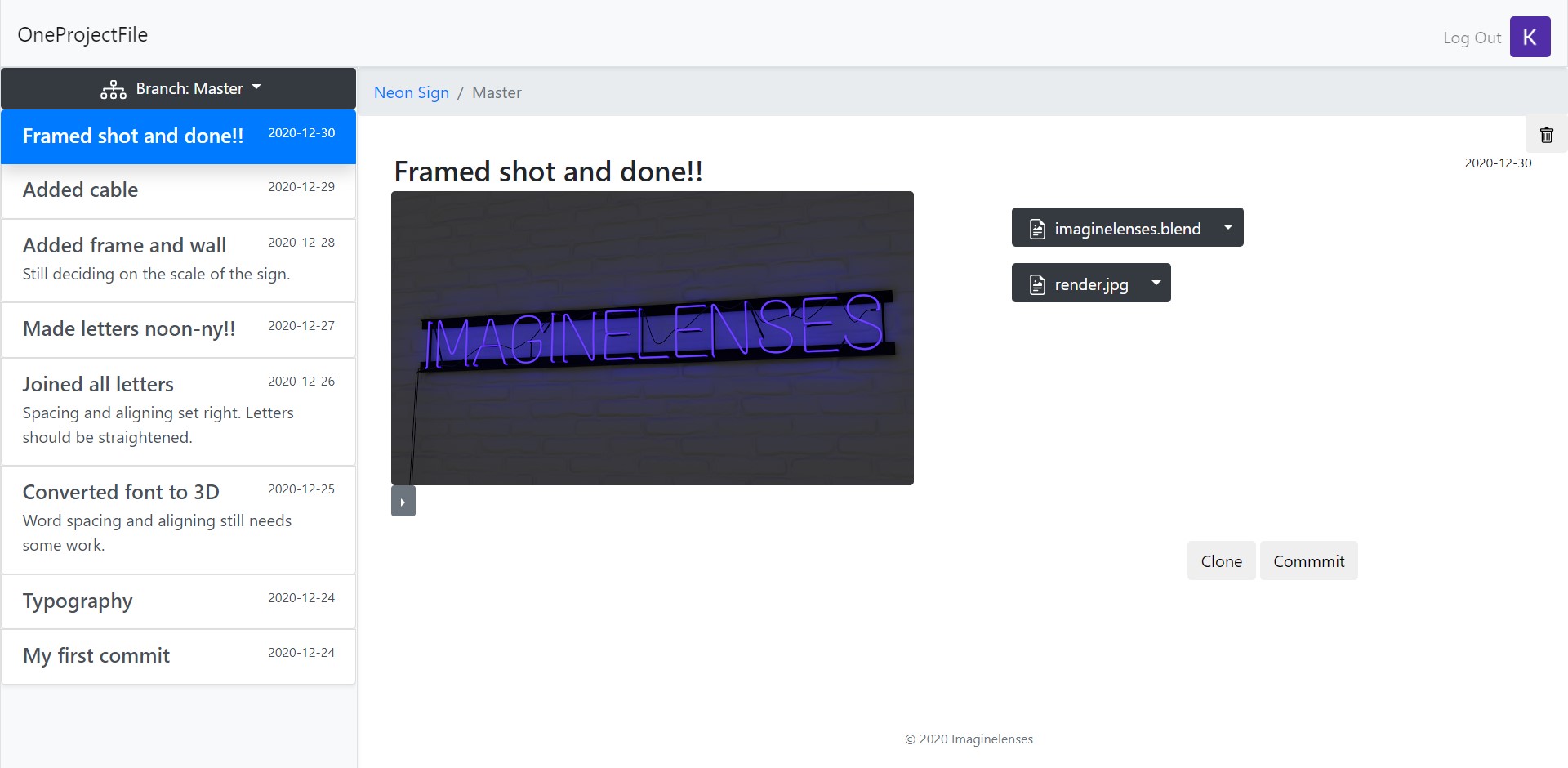
A version control software gives you the ability to store all versions of your file in a single place and not worry about filenames and origanisation. Think of it like having just one file stand to store all versions of your file!
Version control has been standard practice in software development to keep track of changes to code for years now. However, when it comes to working with files other than textual files you usually out of luck.
OneProjectFile aims to bring basic version control functionality to a wide range of filetypes. And this is achieved by storing all the files in the user's Google Drive.
Tech Stack:
Flask (
Python
)
|
JavaScript
|
SQLite
|
HTML5/CSS